DOCS · BASICS
Getting around serenity
serenity puts every Claude Code session on one keyboard-driven map in your terminal, around a master agent that keeps the overview. This page covers what you need on day one.
Requirements
| YOU NEED | NOTES |
|---|---|
| macOS or Linux | Windows is not supported. |
| Claude Code | Logged in with a Claude subscription (Pro or Max, or a Team or Enterprise seat) or an Anthropic Console account. serenity uses that login; it has none of its own. See Usage and cost. |
| tmux 3.2 or later | Every session runs in a tmux pane. |
| git | serenity is scoped to a git repo, and new sessions get their own worktree. |
gh | The first map offers to log it in (see First boot). Without it serenity still runs, but cards show no PR status. |
The install script installs tmux, git, gh and Claude Code if they are missing; Homebrew brings tmux, git and gh as dependencies. Logging in to Claude Code is up to you; the first map offers to log in gh and Slack. serenity doctor checks all of it.
Install
macOS or Linux. One command installs serenity and anything it needs that you don't have yet: tmux 3.2+, git, gh and Claude Code.
$ curl -fsSL https://raw.githubusercontent.com/mukkund1996/serenity/main/scripts/install.sh | shOr with Homebrew (tmux, git and gh come as dependencies):
$ brew install mukkund1996/tap/serenityIf you don't have Claude Code yet, install it first with brew install --cask claude-code. Skip this if you already installed it with npm or Anthropic's installer, or you end up with two copies.
Next: cd into a git repo you work in and run serenity (Starting serenity). The install script adds its directory to your shell profile, so open a new terminal if your shell can't find it yet.
The install script reads these environment variables:
| VARIABLE | DEFAULT | EFFECT |
|---|---|---|
SERENITY_VERSION | latest release | Install a specific version |
SERENITY_INSTALL_DIR | ~/.local/bin | Where the binary goes |
SERENITY_NO_DEPS | unset | Set to 1 to skip installing dependencies |
SERENITY_NO_MODIFY_PATH | unset | Set to 1 to not add the install directory to your shell profile when it isn't on your PATH; the line to add is printed instead |
SERENITY_NO_OPEN | unset | Set to 1 to not open this page in your browser when the install finishes. It never opens in CI or without a display; the URL is printed either way |
serenity runs on your existing Claude Code login and subscription; see Usage and cost.
Install the skill
The free parallel-sessions skill teaches Claude the habits serenity is built on: one git worktree per task, checks for uncommitted changes, unpushed commits, PR state and stacked branches before any cleanup (nothing is removed until you confirm), and short handover notes. It works without serenity. Add it in Claude Code:
/plugin marketplace add mukkund1996/serenity
/plugin install parallel-sessions@serenity
For claude.ai, build the upload zip from a clone with bun run package:skill and upload it under Settings → Capabilities → Skills. See the skill's README.
Starting serenity
serenity is scoped to a repo: run it inside one and you get that repo's map.
$ cd ~/your/repo
$ serenity        # opens the map for this repo
First boot
The first map you open starts with Welcome to serenity: up to three optional steps, each one line. Enter does a step, s skips it, Esc closes the panel.
- Import, when this repo has past Claude Code sessions from the last 14 days: it shows how many and the latest few. Enter imports them all, p picks some. They arrive ended, so nothing runs until you resume one (more).
- GitHub: PRs and checks on your cards, through
gh's own login. - Slack: mentions and DMs that need you, in NEEDS YOU. Nothing is sent until you press y; o opens PRIVACY.md.
Logins run in a popup over the map, and the panel shows who you're connected as. Tokens stay with gh and Claude Code. When every step is done or skipped, You're set, and Enter takes you to the tour.

To redo either later, press Ctrl+, (or , on the map): the settings show GITHUB › Login and SLACK › Login with their status, and Enter on one runs the same popup. From a shell, it's serenity setup github or serenity setup slack. serenity doctor shows both.
The first-boot tutorial
Once you close the welcome panel, you land on the map's one session, learn-serenity, prompted with teach me how to use serenity. Press Enter on it for a hands-on tour of the map, sessions, NEEDS YOU, the master, PRs and the keys. It goes one step at a time, asks you to try each one, and links back to this page. It runs in your repo without a worktree and changes nothing. Press K on it when you're done and it won't come back.
It appears once per machine, and not at all if you already have sessions. To skip it, set "onboarding": false in ~/.config/serenity/config.json or SERENITY_NO_ONBOARDING=1. To take the tour again, install the learn-serenity plugin (/plugin install learn-serenity@serenity) and ask any session teach me how to use serenity.
Bring your existing sessions
Already using Claude Code? Bring those sessions onto the map, whether or not you use tmux. serenity finds them in Claude's own history (~/.claude/projects), which it only reads and never changes. Each one goes onto the map of the repo it ran in, worktrees included. On first boot the welcome panel offers them. After that, an empty map tells you how many it found and points you to I.
$ serenity import               # this repo's, last 14 days: pick which
$ serenity import --all-repos   # every repo, each onto its own map
$ serenity import --since 2026-11-01 --dir packages/api --yes
On the map, I lists the same sessions under From history, below any Claude running in your tmux. Space ticks, a ticks all or none, g adds every other repo, and Enter imports. You can also ask the master, for example import my sessions from yesterday or import what I ran in packages/api.
Imported sessions arrive ended, so nothing runs and nothing is spent until you press Enter on one. It then resumes with claude --resume in the folder or worktree it ran in, and from there on it is a session like any other. If one is still open in another terminal, quit it there (/exit) first: serenity won't run one conversation twice. Sessions whose folder was deleted can't resume, so they are left out.
Press N to start your first session and ? for the shortcuts. q quits the map; your sessions keep running, and the next serenity picks them up again.
| COMMAND | WHAT IT DOES |
|---|---|
serenity | Open the map for the git repo you are in |
serenity import | Bring in your existing Claude Code sessions (--help for options) |
serenity doctor | Check tmux, claude, git and gh, and who GitHub and Slack are logged in as |
serenity setup github | Log in to GitHub with gh (the welcome panel runs this) |
serenity setup slack | Log in to Slack for the master; asks to turn it on for the repo you are in. serenity slack login is the same |
serenity slack on / off / status | Show Slack on this repo's map, or not |
serenity restart | Restart the background daemon (sessions keep running) |
serenity stop | Stop the background daemon |
serenity version | Print the version |
Behind the map, a background daemon keeps the state, receives status from Claude Code hooks, polls PRs through gh and runs the master. If it crashes, a supervisor restarts it and it picks up where it left off.
The map
serenity has three zoom levels:
- Map: the master in the centre, your sessions grouped into topic bubbles around it.
- Topics: every session as a card, with its summary and its PR.
- Session: the real Claude Code pane, untouched.
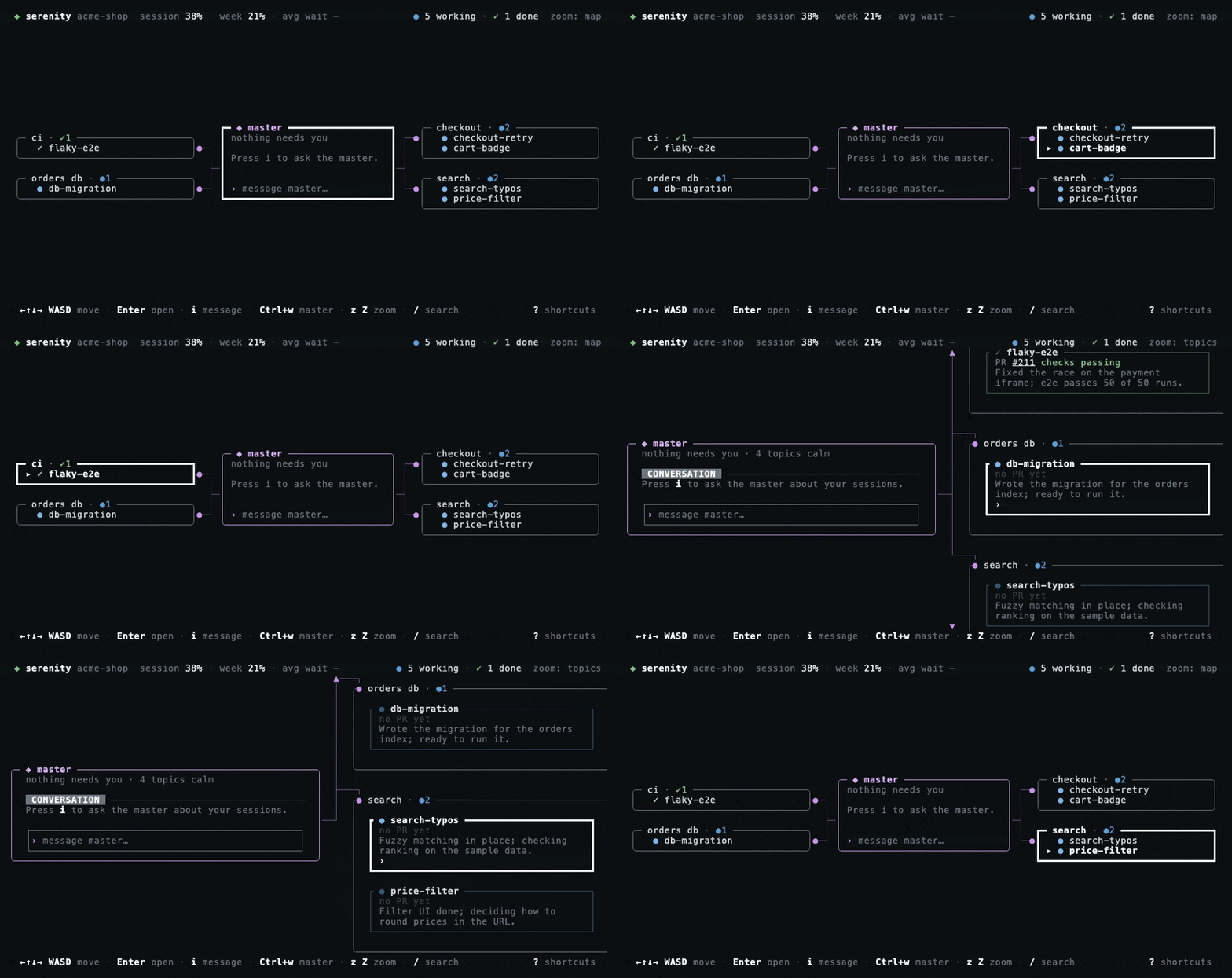
z zooms out to the map, Z zooms in to the topics, and Esc goes up one level. Move with the arrow keys or WASD; [ ] step between topics, c centres on the master and / searches session names, topics and branches as you type.
The master picks the topics for you and keeps them to a handful (ten by default). Each session shows its status, reported by Claude Code's hooks:
| GLYPH | MEANS |
|---|---|
| ◐ yellow | Waiting on you. Only these ask for attention. |
| ● blue | Working. It stays quiet. |
| ✓ green | Finished. |
| name in grey | Idle. |
Sessions
Each session is a real claude process in its own tmux pane, usually in its own git worktree.
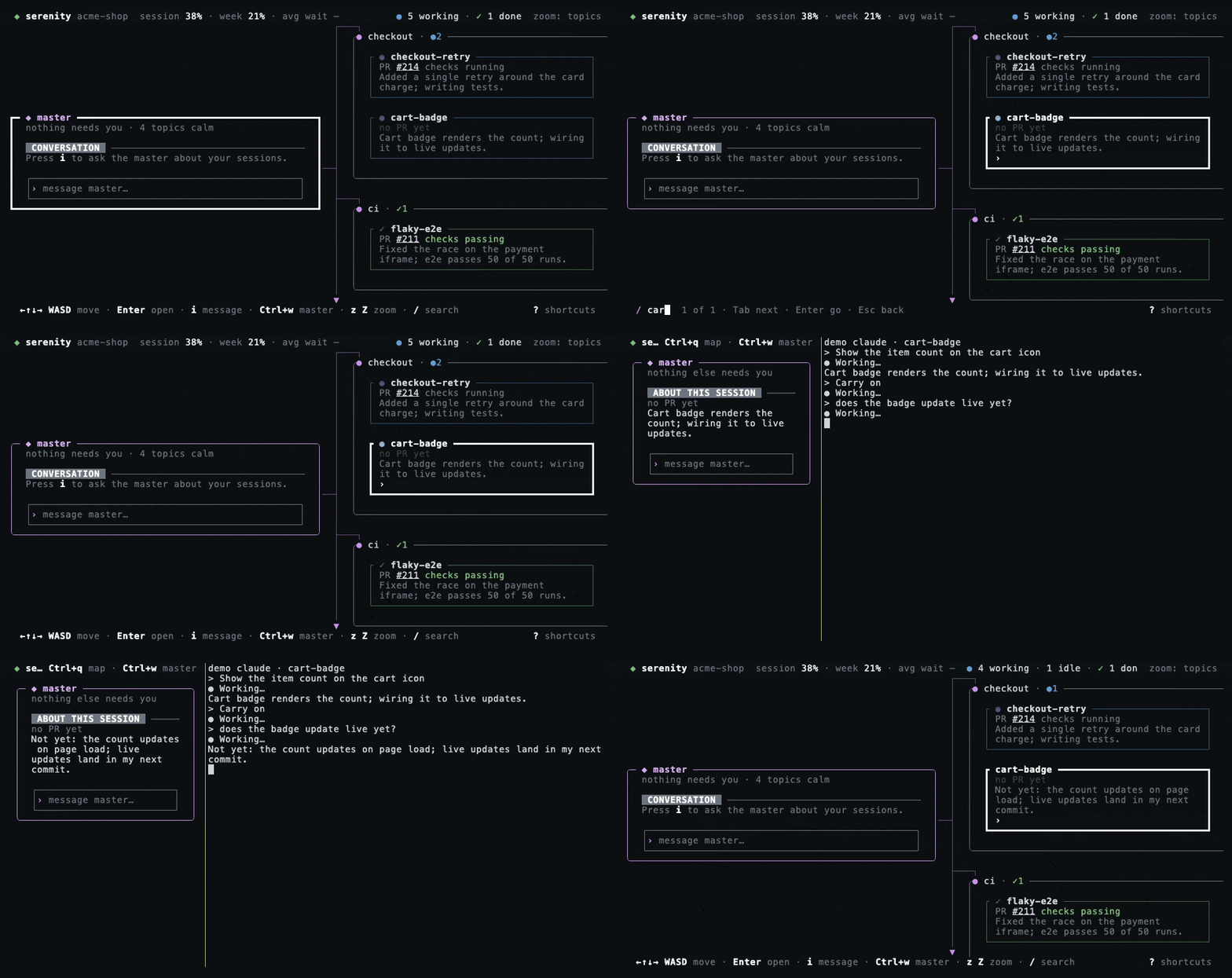
Start one
N opens the New session form: a name, a first prompt, and either a new worktree or an existing branch. A new worktree is created beside the repo, at <parent>/<repo>-<name>, on a new branch named after the session off the base branch. That is the repo's default branch unless you change it in the settings (Ctrl+,): per repo or for all of them, to the branch your main checkout is on or a branch you name. The form's Base field shows which branch it will use, and a branch typed there is used for that session only. You can also ask the master to start sessions for you (see @new).
I imports Claude sessions you already run in tmux. They join the map and stay in their windows. It also lists your past sessions from Claude's history; see Bring your existing sessions.
Let an agent fan out
An agent can split its work into new sessions through serenity's request_sessions tool, which every session has. Ask it in its own pane, for example split this into 3 sessions, and the sessions start at once. If the agent decides on its own that the work should be split, the request waits in NEEDS YOU as Start 3 sessions: …. y starts them and n declines.
Each new session gets its own worktree off the base branch and the self-contained prompt the agent wrote. It shows right under the agent that asked for it: └ on the map, ↳ on its card. It moves with that agent's topic. When it finishes a turn or asks a question, serenity tells the parent agent once it is between turns. Sessions started this way cannot fan out again: one request starts at most 5, and one agent can have at most 8 running at once.
Work in one
Enter on a card attaches to the session: you are in its Claude Code pane, as it is. Ctrl+q takes you back to the map. To send a quick message without attaching, press i on its card.
Pull requests
Each card shows its PR and checks via gh. o opens the PR. Ready PRs get a review request from CODEOWNERS, and a merged PR finishes the session.
Keep, rename, end
- p pins a session you reuse. It is never marked finished or cleaned up, and resumes with
claude --resumewhen you attach after it ended. - f watches a session; r renames it, on its card or its NEEDS YOU row. Type the new name and press Enter, or Esc to cancel. A name is letters, digits,
._-(spaces become-), at most 40 long, not already taken in any case, and never a command word such asnewormove. The tmux window of a session serenity started is renamed too; its branch and worktree keep their names, so its PR stays linked. - K kills the agent. x on a session's card cleans it up, after checking for uncommitted changes, unpushed commits and PR state before it touches the worktree. On a NEEDS YOU item x only dismisses it.
- H shows archived sessions.
NEEDS YOU
NEEDS YOU is the one list of what is waiting on you, and the yellow N need you chip at the top counts it. It holds sessions waiting on an answer or a permission prompt, the master's suggestions, and, if you set up Slack, up to three mentions and DMs that need you to act.
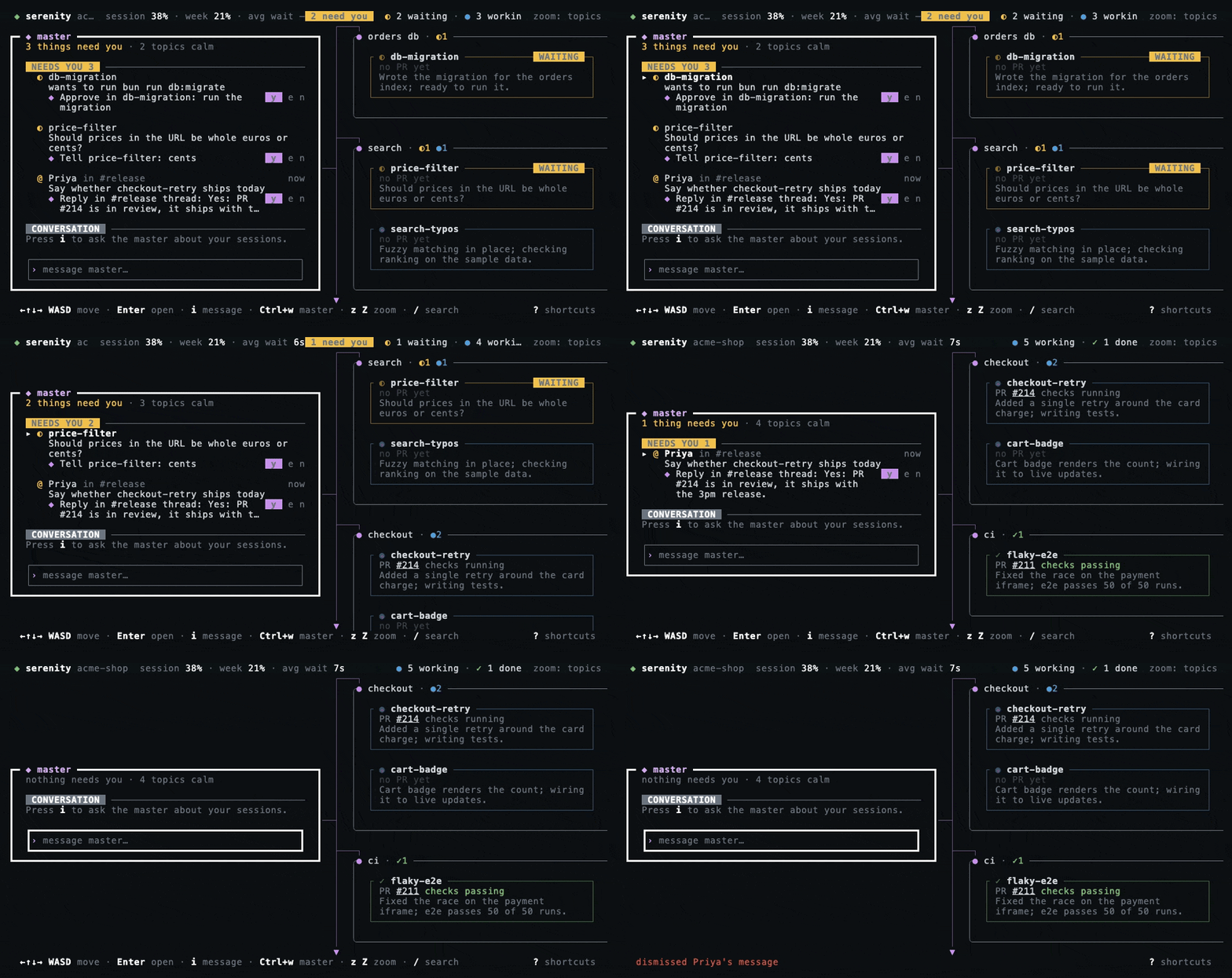
Each item carries a ◆ line that says exactly what y will do and to whom, for example Tell api-auth: …, Reply in #eng thread: … or Start new session fix-login: ….
| KEY | ON A NEEDS YOU ITEM |
|---|---|
| Tab | Jump to the next session that needs you |
| y e n | Run the ◆ suggestion · edit it · decline it |
| Enter | Mark it seen. A Slack item is also opened in Slack; a session waiting on a prompt or a question is attached instead |
| x | Dismiss it, and nothing else: no cleanup, no answer. It shows again when something new happens: a new prompt or question, a new suggestion, a status change, or a newer Slack message. A session's ◆ suggestion is declined. A session's permission prompt, or the master's own request, is left pending, not denied |
Replies the master wants to send to a session wait in their own QUEUE under NEEDS YOU, so they never make an idle session look like it needs you. Enter shows the whole message, y sends it.
Slack is optional. Connect it in the welcome panel on first boot, under Ctrl+, → Slack › Login, or with serenity setup slack. Then turn it on for a repo: serenity slack on inside it, or Ctrl+, → Slack on its map. (Advanced: the list lives under slack.repos in ~/.config/serenity/config.json.) A Slack item drops out as soon as you write after it on Slack.
The master agent
The master sits in the centre of the map and keeps the overview, using three models through your Claude Code login:
- Haiku writes a one-line summary of every session and groups them into topics.
- Sonnet suggests replies, approvals and cleanups, which you accept with y, edit with e or decline with n.
- Opus is the chat: it can see and steer every session, start new ones from a brief, and talk to any session you tag.
The master proposes; nothing runs until you approve it. The exceptions are the ones you ask for in so many words: starting sessions from a brief, and messaging a session you @-mention.
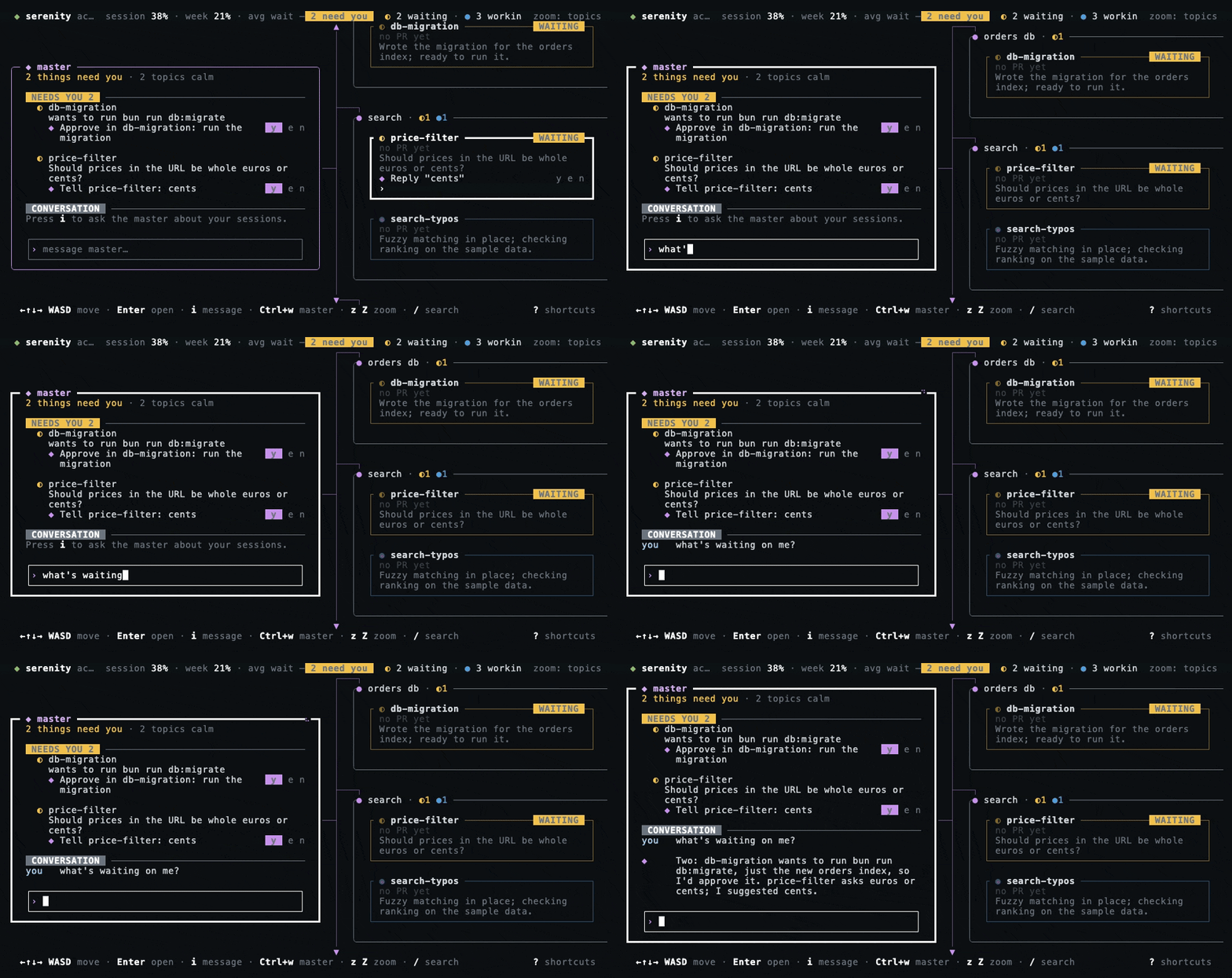
Talking to it
Ctrl+w focuses the master from anywhere. i on the master opens its chat input, which stays open after you send. Shift+Enter or Ctrl+J starts a new line, Esc closes it, and PgUp PgDn scroll the conversation.
Usage and cost
serenity has no API key or model access of its own. Every model call goes through Claude Code with your login, so it counts against your Claude plan's usage limits, or is billed to your Anthropic Console account if that is how Claude Code is logged in. The sessions on the map are ordinary Claude Code sessions and use what they would use anyway; the master's calls come on top:
| ROLE | DEFAULT | RUNS WHEN |
|---|---|---|
| Summarizer | Haiku | A session replies. One short call per reply (a burst of hook events within 1.5 seconds counts once) writes its summary and picks its topic. |
| Suggester | Sonnet | A session starts waiting on you or finishes, its question changes, or its PR merges. One call proposes the next step for y e n. |
| Chat | Opus | The master's chat gets a message: one you send with i, or serenity's note that a session you asked it to watch has finished. It does nothing between messages. |
Slack (off by default) adds calls only while the map of a repo you turned it on for is open: the summarizer's model reads your mentions and DMs once a minute and when you open the map, the suggester's model proposes a follow-up for each new item (and again when a session you told about it answers), and the summarizer's model posts a reply or shares a file you approved.
Status, PRs, cleanup and the map itself use no model. To change a model, press Ctrl+, on the map: the summarizer and suggester switch at once, the chat after serenity restart. Or set any alias or model id claude --model accepts in ~/.config/serenity/config.json, then run serenity restart:
{ "models": { "chat": "sonnet", "summarizer": "haiku", "suggester": "haiku" } }Leave out the ones you don't change; they keep their defaults. The configuration reference lists every field.
@ mentions
In the master's input, @ opens a list that completes as you type: the commands first, each with a hint, then the live sessions of the repo. ↑ ↓ move, Tab or Enter complete, Esc closes the list. Names are exact and case-sensitive, which is why the list completes whole names.
The commands lead you on, so you never have to remember what comes next. A space after @copy, @handover or @move opens the list of live sessions straight away, no second @ needed; type to filter it. After @copy @session a dim hint asks what the new session should do. After @move @session, @ adds another session, and Space or Tab writes to and lists the map's topics, labelled "topic". Pick one, or type a new name. The topic turns sand in the input.
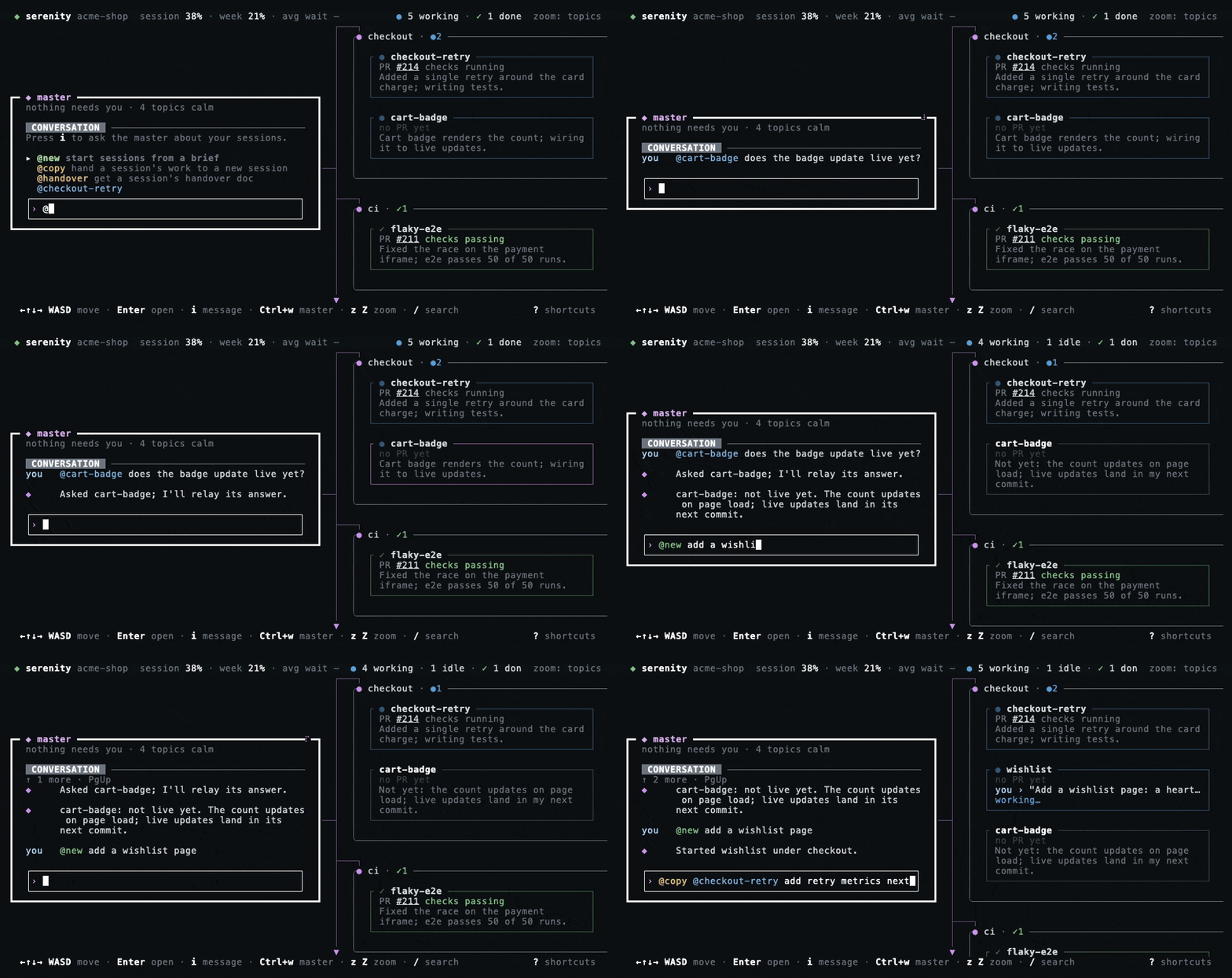
@new green, @copy and @handover yellow. @move, added since this recording, is cyan, and the topic it names sand.@session: talk to a session
A message that tags a session goes to that session at once, lightly reworded to stand on its own. The master doesn't investigate it itself: the session's own agent does the looking. If you asked a question, the master watches the session and condenses its answer for you when it replies.
@api-auth why is CI red?
◈ Asked api-auth; I'll relay its answer.
@new <brief>: start sessions now
Starts the work at once, with no plan to confirm: one session, or one per piece when the brief clearly holds independent pieces. The master picks the names, topics and prompts. A split you don't want costs a K on the extra sessions.
@new add rate limiting to the public API and document it
@copy @session <follow-up>: continue in a fresh session
The session writes a handover doc (goal, state, decisions, open questions, key files, branches and PRs, next steps). serenity keeps a copy that outlives the worktree, then the master starts a new session with your follow-up and the doc attached word for word.
@copy @api-auth add the refresh-token flow next
@handover @session: write it down for someone
Gets a handover doc from the session, or reuses an up-to-date one, and gives you its path. The master can share it on Slack as a file, once you have confirmed the file, the channel and the comment.
@handover @api-auth
@move @session <topic>: move sessions to a topic
Moves every session you tag to the topic, at once and without a question. Tag several to move them together. A topic that doesn't exist yet is created, unless there are already as many topics as maxTopics allows; then nothing moves, and the master names the topics you can use. A name close to an existing topic ("releases") joins it. As with every topic move, a session that is working moves once its turn ends, and while you type in the map moves wait until you stop. The master says what moved and what is waiting.
@move @api-auth @web-login to release
◈ Moved web-login to release; api-auth is working and moves once it stops.
Command words (new, copy, handover, move) are reserved: no session can take them as its name.
Key bindings
serenity is keyboard-only. The footer shows the moves; ? opens the shortcuts in the app.
| KEY | ACTION |
|---|---|
| ←↑↓→ / WASD | Move between nodes |
| Enter | Attach to a session, or go into the master; on a NEEDS YOU item, mark it seen |
| i | Send the focused session a quick message; on the master, open its chat input |
| Ctrl+q | Back to the map from inside a session |
| z Z Esc | Zoom out to the map · zoom in · one level up |
| Ctrl+w | Focus the master from anywhere |
| PgUp PgDn | On the master, scroll its conversation (Shift+↑ ↓ too) |
| Tab | Jump to the next session that needs you |
| y e n | Approve, edit or decline the master's suggestion |
| [ ] | Previous / next topic |
| N I | New session · import (running in tmux, or from Claude's history) |
| o f p | Open the PR · watch · pin |
| r K x | Rename (the branch and worktree keep their names) · kill the agent · clean up, on a session's card; r and K on its NEEDS YOU row too; on any NEEDS YOU item, x only dismisses it |
| / c H | Search sessions · centre on the master · archived sessions |
| Ctrl+, | Settings: base branch, models, max topics, Slack for this repo |
| ? q | Shortcuts · quit the map (sessions keep running) |
In a text field
← → Home End move the cursor, Option+← → by a word. Ctrl+a e u k and Option+Backspace edit as in a shell.
Settings
Ctrl+, opens the settings from anywhere on the map. Terminals that send no extended keys, such as Apple Terminal, can't send Ctrl+,, so , on the map opens them too. ↑ ↓ move, Enter or Space change a setting, ← → step through its values, and Esc closes. Each change is saved to ~/.config/serenity/config.json straight away, and the panel says when it applies.
| SETTING | VALUES | APPLIES |
|---|---|---|
| Base branch: this repo, all repos | Repo default (origin's HEAD), the branch the main checkout is on, or a branch you name. This repo can also follow all repos. | New sessions. A branch that can't be found falls back to the repo default, with a notice. |
| Master models | Opus, Sonnet or Haiku for the chat, summarizer and suggester | Summarizer and suggester at once; the chat after serenity restart |
| Max topics | 1 to 30 | At once |
| Slack: this repo | On or off | On the map at once; the master's Slack tools after serenity restart |